Swapping tokens is one of the most common actions in DeFi. Whether you want to trade ETH for USDC, buy a new token, swap stablecoins or rebalance your portfolio, the goal is simple: receive the best possible output with a smooth onchain experience.
Why Swap on KyberSwap?
DeFi liquidity is fragmented. The best rate for a token pair may be on one DEX, while another DEX may have worse liquidity or higher price impact.
KyberSwap Aggregator solves this by routing trades across multiple DEXs and liquidity sources. This helps users receive better output without opening multiple tabs or manually checking prices.
Key benefits include:
- Access to 400+ DEXs across 17 chains
- Optimized swap routes through KyberSwap Aggregator
- Simple wallet-based experience
- No traditional account required
- Support for major DeFi actions in one platform
- Product options such as Limit Order, Cross-chain Swap and KyberEarn
For users, this means a faster and more efficient way to swap tokens onchain.
How to Swap on KyberSwap.com
1. Open KyberSwap.com
Go to KyberSwap.com and open the Swap page. Always double-check the URL before connecting your wallet.
You will need a Web3 wallet such as MetaMask, Rabby, Trust Wallet, Coinbase Wallet or another supported wallet. You also need enough native gas token on the selected network to pay transaction fees.
For example, ETH is used for gas on Ethereum and Base, while BNB is used on BNB Chain.
2. Connect Your Wallet
Click Connect Wallet and choose your preferred wallet. Approve the connection request in your wallet.
Connecting your wallet lets KyberSwap read your wallet address, balance and selected network. It does not give KyberSwap control over your funds as KyberSwap is a non-custodial platform and you must approve every transaction.
After connecting, select the chain you want to swap on.
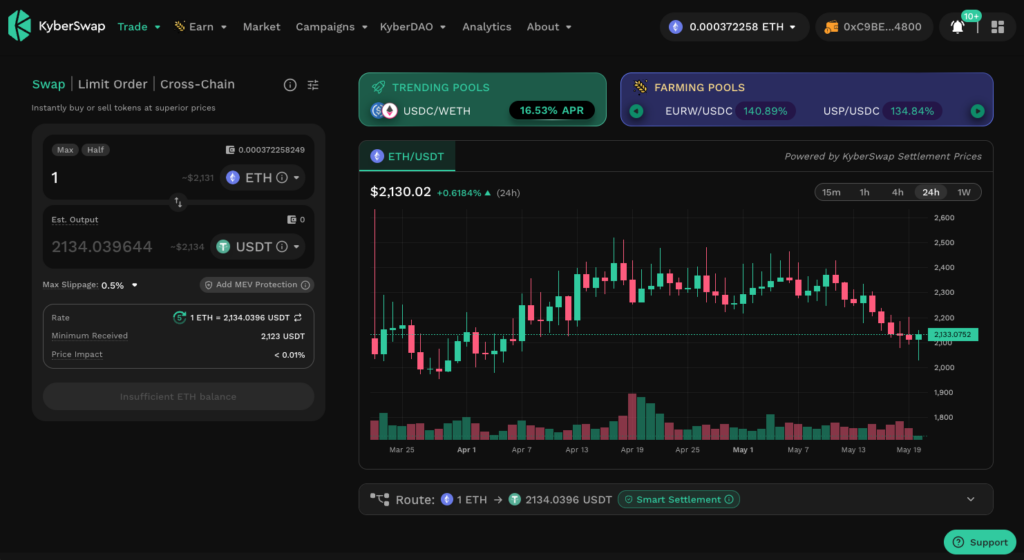
3. Choose the Token Swap Pair
You can search by token name, symbol or contract address. For newer or less common tokens, using the contract address is safer because some tokens may have similar names.
Always verify the token contract before trading unfamiliar assets.
KyberSwap will show an estimated output based on the current route, available liquidity and market conditions.
You can enter the amount manually or use quick options such as Max or Half when available. When using Max, remember to leave enough native token for gas.
4. Review the Swap Details
Before confirming, review the key swap information:
| Detail | Meaning |
|---|---|
| Estimated output | The amount you are expected to receive |
| Minimum received | The lowest amount you will receive if the swap succeeds |
| Price impact | How much your trade affects the market price |
| Slippage | The accepted difference between quote and execution |
| Gas fee | The blockchain network fee |
| Route | The path used to execute your swap |
The most important number is minimum received. If the final output falls below this amount, the swap will revert instead of executing at a worse rate.
5. Adjust Slippage
Slippage is the difference between the quoted price and final execution price. It can happen because token prices and liquidity change before your transaction is confirmed.
KyberSwap lets you set Max Slippage. Lower slippage gives more protection but may increase failed transactions. Higher slippage gives more room for execution but may result in worse output.
Simple guide:
| Swap Type | Suggested Approach |
|---|---|
| Stablecoin swap | Lower slippage |
| Major liquid pair | Moderate slippage |
| Volatile token | Higher slippage may be needed |
| Low-liquidity token | Review price impact carefully |
| Large trade | Consider splitting or using Limit Order |
6. Approve the Token
If this is your first time swapping a token through KyberSwap on that chain, you may need to approve it first.
Token approval gives the smart contract permission to use the token for your swap. Some tokens may also support Permit, which allows gasless approval through a signed message.
Review approval amounts carefully. Exact approval can reduce risk, while unlimited approval can be more convenient for frequent traders.
7. Confirm the Swap
After approval, click Swap and review the final confirmation screen.
Check the output amount, minimum received, slippage, gas fee and token pair again. If everything looks correct, confirm the transaction in your wallet.
Once confirmed, the transaction will be submitted onchain.
8. Track Your Swap
After submitting, you can track the transaction in your wallet, on KyberSwap or through a blockchain explorer.
If the output token does not appear in your wallet, you may need to import the token manually using its contract address.
KyberSwap Swap vs Other Trading Options
| Option | Best For | Main Benefit |
|---|---|---|
| KyberSwap Swap | Instant token swaps | Aggregates liquidity for better rates |
| Single DEX | Simple direct swaps | Easy if you already know the best pool |
| CEX trade | Offchain trading | Fast but requires centralized custody |
| KyberSwap Limit Order | Target price trading | Executes only at your selected price or better |
| KyberSwap Cross-chain Swap | Moving across chains | Swap between networks from one interface |
For instant onchain swaps, KyberSwap Swap is ideal. For target-price execution, KyberSwap Limit Order may be better. For moving assets across networks, Cross-chain Swap is the better fit.
Tips for Better Swap Results
Always check the estimated output and minimum received before confirming.
Watch price impact, especially for large trades or low-liquidity tokens.
Set slippage based on market conditions. Too low may fail. Too high may result in worse execution.
Verify token contracts before swapping unfamiliar assets.
Review every wallet request before signing.
FAQ
What is KyberSwap used for?
KyberSwap is used for token swaps, cross-chain swaps, limit orders, earning opportunities and DeFi portfolio actions.
Do I need an account?
No. KyberSwap is a non-custodial, no-KYC platform, allowing users to swap tokens directly from their own wallets while staying in control of their funds.
Does KyberSwap charge a swap fee?
KyberSwap does not charge a flat interface swap fee. Users still pay network gas fees and liquidity-related costs reflected in the output.
What is slippage?
Slippage is the difference between the quoted price and final execution price.
What does minimum received mean?
Minimum received is the lowest output amount you accept. If the swap cannot meet it, the transaction reverts.
Why did my swap fail?
A swap may fail because of price movement, low slippage, network congestion, insufficient gas or liquidity changes.
Can I swap custom tokens?
Yes. You can search by contract address and import supported tokens, but always verify the token first.
Final Thoughts
Swapping on KyberSwap.com is simple: connect your wallet, choose a chain, select your tokens, review the route, approve the token and confirm the swap.
Behind the simple interface, KyberSwap Aggregator compares routes across 400+ DEXs on 17 chains to help users access better rates and smoother execution.
For DeFi users, the best swap is not only about speed. It is about receiving more tokens, managing slippage and staying in control of every transaction.