Limit orders are one of the most useful trading tools in crypto. Instead of swapping instantly at the current market price, you can set the price you want and let the order wait until the market reaches it.
What Is a Limit Order?
KyberSwap Limit Order was created to enable our users to trade on their own terms. This means users are able to predefine their preferred swap rates which are automatically settled on-chain by KyberSwap’s network of takers. Create, modify, and cancel limit orders for free with KyberSwap Limit Order.
No more having to monitor the markets around the clock waiting for your target price to be reached. Trades are always settled when prices favor the trader, meaning that users might actually receive more tokens than expected. Critically, users have complete ownership of their assets until a matching trade has been found.
For example, suppose ETH is trading at $3,500 but you only want to buy when it drops to $3,300. You can create a limit order to buy ETH at $3,300. If the market reaches that level and the order can be filled, the trade executes.
The same idea works for selling. If you hold a token and want to sell only when the price rises to a certain level, you can set that price in advance.
A normal swap is for instant execution. A limit order is for price-based execution.
KyberSwap Limit Order allows traders to swap tokens at a specified price or better, giving users more control over when and how they trade.
Why Use Limit Order on KyberSwap?
Crypto markets move quickly. Prices can change while you sleep, work or step away from your screen. A limit order helps you plan trades ahead of time instead of reacting emotionally.
KyberSwap Limit Order is useful when you want to:
- Buy a token only if the price drops to your target
- Sell a token only if the price reaches your take-profit level
- Avoid watching charts all day
- Trade with more discipline
- Reduce impulsive entries and exits
- Set a clear trading plan before the market moves
KyberSwap is more than a simple swap interface. It is a Smart DeFi Hub where users can access Swap, Limit Order, Cross-chain Swap and KyberEarn in one place. KyberSwap Aggregator connects to 420+ liquidity sources across 17 chains and has facilitated over US$150B in transactions.
Limit Order vs Instant Swap
Both tools are useful, but they serve different needs.
| Feature | Limit Order | Instant Swap |
|---|---|---|
| Execution | Executes only at your target price or better | Executes immediately |
| Best for | Planned entries and exits | Fast trading |
| Price control | Higher | Lower |
| Fill guarantee | Not guaranteed | More likely to execute immediately |
| User action | Set order and wait | Confirm swap now |
| Common use case | Buy the dip or take profit | Swap tokens quickly |
Use Limit Order when price matters more than speed.
Use Instant Swap when speed matters more than waiting for a target price.
For example, if you need USDC now to enter another DeFi position, an instant swap may be better. But if you want to buy ETH only after a pullback, a limit order is usually the better choice.
How to Use Limit Order on KyberSwap
Step 1: Go to KyberSwap
Open the KyberSwap app and connect your Web3 wallet.
Make sure you are using the correct wallet and the correct network. If your funds are on Ethereum, connect to Ethereum. If your funds are on BNB Chain, Arbitrum or another supported network, switch to that network before creating your order.
KyberSwap is non-custodial. That means users trade directly from their own wallets and remain in control of their assets.
Step 2: Open the Limit Order Page
Go to the trading interface and choose Limit Order.
The Limit Order page looks similar to a normal swap page, but there is one major difference. Instead of accepting the current market rate, you set the rate you want.
This gives you more control over your trading condition.
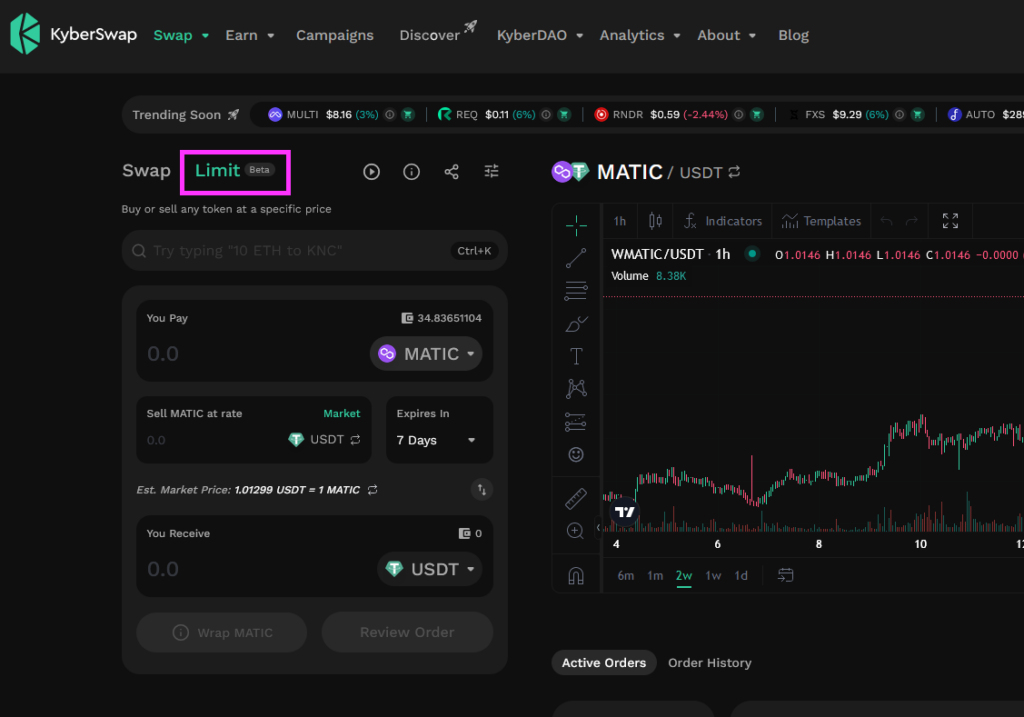
Step 3: Choose the Token You Want to Sell
Select the token you want to sell.
This is the token that will leave your wallet if the order is filled. For example, if you want to use USDC to buy ETH, choose USDC as the token you sell.
Check your wallet balance before continuing. You need enough token balance for the order amount.
Step 4: Choose the Token You Want to Receive
Next, choose the token you want to receive.
For example:
- Sell USDC to buy ETH
- Sell ETH to receive USDC
- Sell KNC to receive USDT
- Sell a token when it reaches your target price
Always double-check the token contract, especially when trading smaller or newer tokens. Some tokens may have similar names or symbols.
Step 5: Enter the Amount
Enter the amount you want to trade.
You can choose a small amount if you are testing the flow for the first time. You can also enter a larger amount if you already know your target and trading plan.
Before placing the order, make sure you understand the value of the trade, the selected pair and the expected output.
Step 6: Set Your Target Price
This is the most important step.
The target price is the price condition for your order. The order will execute only if the market reaches your selected price or better.
For a buy order, your target price is usually lower than the current market price.
For a sell order, your target price is usually higher than the current market price.
Example:
ETH is trading at $3,500. You want to buy only if ETH drops to $3,300. You set your limit order at $3,300.
Another example:
You bought a token at $1.00 and want to sell at $1.30. You can set a sell limit order at that target.
A realistic target has a better chance of being filled. A target that is too far from the market may stay open for a long time or expire without execution.
Step 7: Set the Expiry Time
The expiry time controls how long your order remains active.
A short expiry is useful for short-term trading. A longer expiry gives the market more time to reach your target price.
There is no perfect expiry for every trade. It depends on your strategy, token volatility and how patient you want to be.
For example, a short-term trader may set an order for a few hours. A swing trader may prefer a longer duration.
Step 8: Approve the Token if Needed
If you are using a token for the first time on KyberSwap Limit Order, your wallet may ask you to approve token spending.
Approval gives the smart contract permission to use the token for the order. This is a normal DeFi step, but you should still review the request carefully.
Step 9: Place the Limit Order
After reviewing the order, confirm the wallet request.
Once placed, the order will appear in your active orders. You can monitor its status from the Limit Order page.
How to Check Your Limit Order Status
After placing an order, you can check it from your order list.
A limit order can have different statuses:
- Active: The order is active and waiting to be filled
- Partially filled: Part of the order has been executed
- Filled: The full order has been executed
- Expired: The order expired before being fully filled
- Cancelled: The order was cancelled by the user
A limit order is not guaranteed to fill. It depends on market price, liquidity, order size and whether a taker is available to execute the trade.
How to Cancel a Limit Order on KyberSwap
KyberSwap supports two main cancellation options: Gasless Cancel and Hard Cancel.
Gasless Cancel lets users cancel a limit order without paying gas, though users may need to wait up to 5 minutes for the cancellation to be confirmed. Hard Cancel cancels the order immediately onchain and requires a gas fee.
Gasless Cancel is useful when saving gas is more important than instant cancellation.
Hard Cancel is useful when you want the order cancelled as quickly as possible.
For example, if the market moves sharply and you no longer want the order to be filled, Hard Cancel may be the safer choice. If there is no urgency, Gasless Cancel may be enough.
Best Practices for Using Limit Orders
1. Set a realistic target price
A very aggressive target may look attractive, but it may never fill. Check current market conditions before setting your price.
2. Use longer expiry for wider targets
If your target price is far from the current market, give the order more time. A short expiry may end before the market has a chance to move.
3. Check token liquidity
Low-liquidity tokens can be harder to trade. Even if the market touches your target, the order may not fill if liquidity is weak or the order is not attractive for takers.
4. Keep native gas token in your wallet
You may need gas for approval, Hard Cancel or other onchain actions. Keep ETH, BNB, POL, AVAX or the relevant native token for the chain you are using.
5. Review every wallet request
Always check what your wallet asks you to approve or sign. Make sure the token, amount and network are correct.
FAQ
What is KyberSwap Limit Order?
KyberSwap Limit Order is a trading feature that lets users buy or sell tokens at a selected price or better.
Is a limit order the same as a swap?
No. A swap executes immediately at the current available rate. A limit order waits until your target price is reached.
Does a limit order always execute?
No. A limit order only executes if the market reaches your target price and the order can be filled.
When should I use Limit Order?
Use Limit Order when you have a specific buy or sell price in mind and do not need immediate execution.
When should I use Instant Swap?
Use Instant Swap when you want to trade immediately and accept the current available market rate.
Can beginners use limit orders?
Yes. Limit orders can help beginners trade with more discipline, but users should understand that execution is not guaranteed.
Conclusion
KyberSwap Limit Order is a useful tool for traders who want more control over their price.
Instead of swapping immediately, users can set a target price, choose an expiry time and let the order wait for the right market condition. This helps traders plan entries, set take-profit levels and avoid emotional decisions.
Use Instant Swap when you need speed. Use Limit Order when you want to trade at your chosen price.
For traders who want a smarter way to manage onchain trades, KyberSwap Limit Order adds more flexibility to the trading experience while keeping users in control of their funds.